Showing posts with label Execution Plan. Show all posts

Aug 30, 2011

UNION Vs UNION ALL

This issue came up during one of the training I conducted recently. There is a popular belief that UNION will ALWAYS perform a unique filter on the data.  While it is true that UNION Clause will ALWAYS RETURN unique set of data, filtering operation either sort or distinct select is not guaranteed.
Take this example:


SELECT SalesOrderID, SalesOrderDetailID, OrderQty, ProductID, UnitPrice, UnitPriceDiscount FROM SalesLT.SalesOrderDetail WHERE ProductID = 799
UNION
SELECT SalesOrderID, SalesOrderDetailID, OrderQty, ProductID, UnitPrice, UnitPriceDiscount FROM SalesLT.SalesOrderDetail WHERE ProductID = 989
SELECT SalesOrderID, SalesOrderDetailID, OrderQty, ProductID, UnitPrice, UnitPriceDiscount FROM SalesLT.SalesOrderDetail WHERE ProductID = 799
UNION ALL
SELECT SalesOrderID, SalesOrderDetailID, OrderQty, ProductID, UnitPrice, UnitPriceDiscount FROM SalesLT.SalesOrderDetail WHERE ProductID = 989

Nov 18, 2010

I am speaking today at SSSLUG on Excution Plans

Today the sessions include an introduction to Denali and the second part of Execution Plans Explained. Today's session focuses on specific items in the execution plan:  Seeks, Scans and Physical Join operators.

Oct 22, 2010

NO Recompilations when (parameter) values are different

Please read another post on this subject by Dinesh Priyankara.
http://dinesql.blogspot.com/2010/10/do-we-need-to-recompile-stored.html

This is another topic came in the last user group meeting: 
Does SQL Server generate a new plan (in other word recompile) the query if the parameter value is changed?
The actual answer is it depends:
First of all, SQL Server does not go through the recompilation process simply because the parameter is changed.
As I mentioned in the previous blog, there are only certain conditions where an existing execution plan is thrown away and a new plan is used.

Even though in my example, a new plan is created between these two statements, the value is not the cause.

DBCC FREEPROCCACHE
GO

SELECT * FROM Sales.SalesOrderDetail
WHERE SalesOrderDetailID <= 1
GO
SELECT * FROM Sales.SalesOrderDetail
WHERE SalesOrderDetailID <= 1000
GO
When I ran the queries and captures the SQL:Recompile event, nothing was captured. Interestingly, ShowPlan XML for Query Compilation too, didn't give any number as the reason for recompilation. For me it looked like SQL Server didn't consider them as same query.
I removed the GO statement in between and tried too. The result was same. (except the column line number showed 1 and 2 instead of 1 always.
The image is attached.


Fortunately, SQL Server provides a few DMVs (dynamic management views) which allows us to check the execution plans

Oct 21, 2010

Recompilations after index creation

Yesterday I got an interesting question: Does adding an index to a table force the execution plans to be recreated?
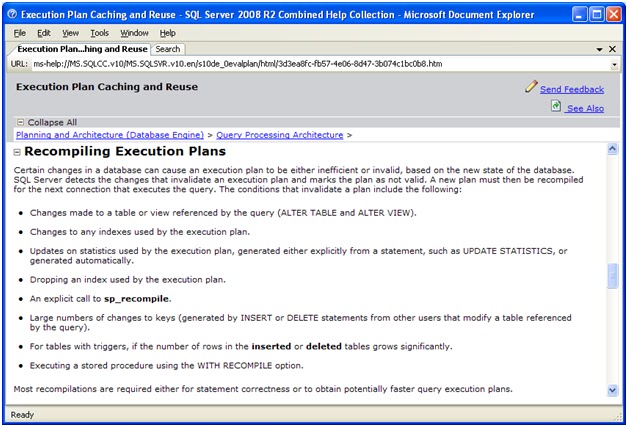
Books online says this:

Please note the first, second and fourth bulleted points.

It says either a structure should be changed or index used by the query should be changed. In other words not any change in the index will not force recompile.

Jan 15, 2010

Lies, damn lies and statistics

I was thinking for a long time to write something about statistics. In fact, I even know what to write: How much statistics are reliable and how they affect the query execution plans etc. I even thought of a heading: which you see now. But some or other reason, I didn’t do it.
Finally now I made it.

Statistics is an internal mechanism used by SQL Server to make decisions on query execution plans. For example, assume that we have a query like this (I am using AdventureWorks database which came with SQL Server 2005. It is available for download from Codeplex)


SELECT * FROM HumanResources.Employee WHERE ManagerID = 263
SELECT * FROM HumanResources.Employee WHERE ManagerID = 6

We have an index on ManagerID. Now the issue is you will get two possible (most likely) execution plans generated.

Sep 15, 2009

Handling Optional Parameters

I have spoken at different forums and written in many forums about how optional parameters could be handled. As I have seen this issue again and again I thought of writing a blog on this. In this blog I will talk on how mismanagement of optional parameters can hinder the performance
Let us consider the table Sales.SalesOrderHeader in AdventureWorks. This table has two columns for us to consider: SalesOrderID and CustomerID

Assume that you want to retrieve the rows for a SalesOrderID or for a CustomerID. That means, if you know the SalesOrderID you will retrieve only one row of data, otherwise, multiple rows of data.
This table has 700 data pages (5600 KB) and 360 index pages (2880 kb) where IX_SalesOrderHeader_CustomrID uses 43 pages this has the depth of 2 (Root page and leaf only).
This information could be obtained using the following:


EXEC sp_SpaceUsed 'Sales.SalesOrderHeader'
select * from sys.dm_db_index_physical_stats(DB_ID(), OBJECT_ID('Sales.SalesOrderHeader'), INDEXPROPERTY(OBJECT_ID('Sales.SalesOrderHeader'),'IX_SalesOrderHeader_CustomerID','IndexID'),1,DEFAULT)


How assume that you have written a stored procedure to handle this.


Sep 14, 2009

NOT IN, NOT EXISTS and LEFT JOIN ... What To Use?

This blog is to analyze the differences between the above statements and to find what suits where better.
Lets consider this scenario: (This example is taken from AdventureWorks) Find all customers who do not have Sales. It could be written in three ways:


SET ANSI_NULLS ON
-- Method 1: Using NOT IN
SELECT CustomerID, AccountNumber
FROM Sales.Customer
WHERE CustomerID NOT IN
(
SELECT CustomerID
FROM Sales.SalesOrderHeader
)

-- Method 2: Using NOT EXISTS
SELECT CustomerID, AccountNumber
FROM Sales.Customer C
WHERE NOT EXISTS
(
SELECT 1
FROM Sales.SalesOrderHeader S
WHERE S.CustomerID = C.CustomerID
)

-- MEthod 3: Using LEFT JOIN
SELECT c.CustomerID, c.AccountNumber
FROM Sales.Customer c
LEFT JOIN Sales.SalesOrderHeader soh
ON soh.CustomerID = c.CustomerID
WHERE soh.CustomerID IS NULL


All the above queries give the same results, show the same execution plan, take the same amount of resources in IO and executed almost at the same time. However, this example is quite simple. The column CustomerID is not having any null values. When it comes with null values, the results may vary:

Aug 25, 2009

The Tipping Point.

Many DBAs have faced with execution plans where it was an index seek for many days suddenly it became an index scan. (or vice versa). So when and how SQL Server decides what to use? (I am not talking about re-writing the query in different way so that the execution plan can get changed. it is the same query suddenly gets a new execution plan.)

SQL Server keeps statistics to determine the best method. When the data requested is beyond a particular percentage, the decision to scan is taken.

Interesting? Kimberly L. Tripp a great speaker, trainer and writer in SQL Server gives some more information:

http://www.sqlskills.com/BLOGS/KIMBERLY/category/The-Tipping-Point.aspx

Aug 21, 2009

(Mis) Understanding Scans and Seeks

Have you ever expected an index seek or clustered index seek for a query, where SQL Server turned its back and decided to use scan?
Do you believe in this statement: "Scan reads through the object (table/index) from top to bottom looking for the records that it needs while seek goes directly to the part of the object that it needs and reads to where the data that it needs ends. This is obviously a must more efficient operation than a scan, as database server already knows where the data is that it is looking for"

If your answer is true for any of the questions, you need to read my article.
http://www.sql-server-performance.com/articles/dba/understanding_scans_seeks_p1.aspx

As the above site does not allow reader feedback, I am opening this area for your comments

Jan 11, 2008

Index /Clustered Index SCAN When Top 1 Is Used

One of my recent articles is published at SQL Server Worldwide User Group.

Even a simple statement which SELECTs the last (or first) row of a table may cause clustered index scan or index scan. But there are ways to make it a seek.

Interested?? Have a look at http://www.sswug.org/see/37061

The site may request you to be a member to read the article. But eventhough you may have to give your credit card details, You can have a free trial membership.

If you dont like the site, you can cancel the membership without paying any money.